Run models on Nebius Token Factory (via LiteLLM API)


References and Acknowledgements
Prerequisites
- Nebius API key. Sign up for free at Token Factory
- And complete the setup
1 - Install Dependencies
In [ ]:
%%capture

!pip install -q "litellm==1.96.2" "python-dotenv>=1,<2"
2 - Load Configuration
In [ ]:
import os, sys

## Recommended way of getting configuration
if os.getenv("COLAB_RELEASE_TAG"):
   print("Running in Colab")
   from google.colab import userdata
   NEBIUS_API_KEY = userdata.get('NEBIUS_API_KEY')
else:
   print("NOT running in Colab")
   from dotenv import load_dotenv
   this_dir = os.path.abspath('')
   parent_dir = os.path.dirname(this_dir)
   sys.path.append (os.path.abspath (parent_dir))
   load_dotenv()
   NEBIUS_API_KEY = os.getenv('NEBIUS_API_KEY')

## quick hack (not recommended) - you can hardcode the config key here
# NEBIUS_API_KEY = "your_key_here"

NEBIUS_BASE_URL = "https://api.tokenfactory.nebius.com/v1/"
NEBIUS_MODEL = os.getenv("NEBIUS_MODEL", "openai/gpt-oss-120b").strip()

if NEBIUS_API_KEY:
  print ('✅ NEBIUS_API_KEY found')
  os.environ['NEBIUS_API_KEY'] = NEBIUS_API_KEY
else:
  raise RuntimeError ('❌ NEBIUS_API_KEY NOT found')
3 - Pick a Model
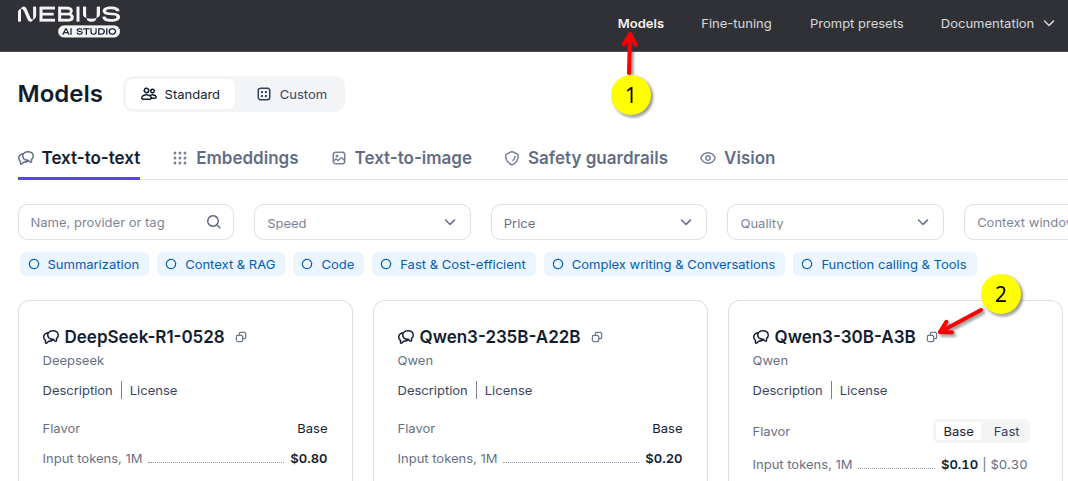
- Go to models tab in tokenfactory.nebius.com
- Copy the exact model ID. This notebook defaults to
openai/gpt-oss-120b, which was present in the public catalog on 2026-08-13. SetNEBIUS_MODELto override it if the catalog changes.
4 - Run the Model
In [ ]:
%%time

import os
from litellm import completion

response = completion(
    model=f"nebius/{NEBIUS_MODEL}",
    api_key=NEBIUS_API_KEY,
    api_base=NEBIUS_BASE_URL,
    messages=[
        {
            "role": "user",
            "content": "What is the capital of Netherlands?",
        }
    ],
    temperature=0.1,  # either set temperature or `top_p`
)

print ('----model answer -----')
print (response.choices[0].message.content)
print ('\n----- full response ----')
print(response.to_json())
print ('---------')
5 - Try Your Queries
Go ahead and experiment with your queries. Here are some to get you started.
Write python code to read a csv file
write a haiku about cats